Chances are if you are using Xcode 3 and you haven’t played with the build settings for a project that you are still using the GNU Compiler Collection, GCC. Apple is slowly phasing out support for GCC and moving to new compiler technologies based on the Low Level Virtual Machine (LLVM) open source project. The LLVM based tools are available (with some differences) to both Xcode 3 and 4 so you do not have to wait until you migrate to Xcode 4 to start taking advantage of it.
The LLVM Project
The LLVM project is an open source collection of tools (see LLVM.org for the full list) that build on a core set of libraries that provide an optimizer and code generator. Other tools in the LLVM project include the Clang frontend parser and the LLDB debugger. Xcode 4 exploits this modular approach to provide features such as improved syntax highlighting and to suggest fixes to common coding errors.
As of writing GCC remains the default compiler for Xcode 3 but with the release of Xcode 4 the default compiler for new projects has changed to LLVM-GCC. In this post I’ll take a look at the options for both Xcode 3 and 4.
Compiler Options in Xcode
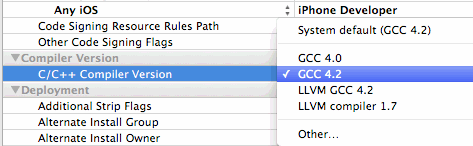
You can set the compiler you want to use in Xcode in the build settings for a project or target The compiler options vary slightly between Xcode 3 and 4 as shown below:
- Xcode 3 Compiler Verisons
- Xcode 4 Compiler Versions
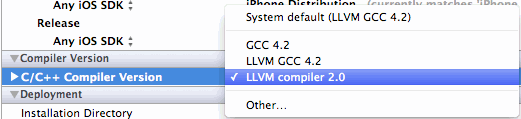
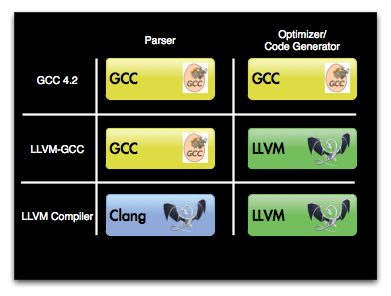
There are really three compiler options depending on whether you want to stick with GCC, switch to LLVM or use a hybrid approach for backward compatibility. I am ignoring the GCC 4.0 option as that is now deprecated and is not even present in Xcode 4. The diagram below shows the differences between the three options:
The implications for each of these options varies a little depending on whether you are using Xcode 3 or Xcode 4 and also whether you are targeting iOS or Mac OS X.
Legacy GCC support (GCC 4.2)
If you need to stick with GCC 4.2 you can but Apple has stated that they are no longer fixing bugs in GCC so this is not a long term option. GCC 4.2 is the default compiler for Xcode 3 and for now remains an option in Xcode 4.
LLVM-GCC 4.2
This hybrid option uses LLVM as an optimizer and code generator plug-in to the GCC front end parser. This is now the default compiler in Xcode 4 for new projects but you can also choose it for Xcode 3 projects. The main reason to switch to LLVM-GCC is that it offers both performance gains and faster build times. The improvements to build times though are limited since this option still uses the GCC frontend parser and for debug builds (which are probably what you are building most often) it does not make use of the optimizer.
LLVM compiler
This option makes full of use of the LLVM toolset. It uses the Clang frontend and LLVM backend optimizer and code generator. Apple claims that the Clang parser is 3x faster than GCC for debug builds whilst maintaining compatibility with GCC. However the advantage of using Clang is about much more than just speed. If you have already used the Build and Analyze option in Xcode you will have seen some of the power of Clang. It provides much more precise error and warning messages along with suggestions for how to fix the problem.
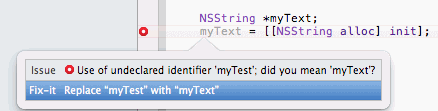
For example, if you make a typo when referring to a previously declared variable Clang is smart enough to figure out what you meant and suggest the correction. It then actually assumes the correction has been applied for the rest of the code. This reduces the number of meaningless error messages that you see making it much easier to focus in on the actual error. Xcode 4 makes use of this to provide the Fix-it feature so that you see the suggested fix in your code which you can then with one click accept:
So if I write this:
NSString *myText;
myTest = [[NSString alloc] init];
Xcode will make use of Clang to suggest the following fix for me:
Differences between iOS and Mac OS X
The LLVM compiler has supported both iOS and Mac OS X since Xcode 3.2.3 (earlier versions only targeted OS X). Until recently it also did not support C++ with Xcode 3 though I believe that limitation no longer exists. So regardless of whether you are developing for iOS or Mac OS X you can make use of LLVM.
One limitation to be aware of is with the LLDB debugger. It is only available with Xcode 4 but currently only supports Mac OS X. You cannot select the LLDB debugger if your working on iOS targets you have to stick with GDB for now.
Which to Choose?
So which of the three options should you choose? The one I would now avoid, unless you have a strong reason otherwise, is plain old GCC 4.2. Apple is no longer fixing it and the LLVM-GCC option looks to be a better choice. Changing compilers for an existing app is a major change so you should test thoroughly of course if you do make the switch.
For new apps the LLVM-GCC option looks to be the safe option. Apple considers it to be stable and mature enough to make it the default choice in Xcode 4 (two words which you may not associate with Xcode 4 itself) and since it uses the GCC parser backward compatibility should be good.
If LLVM-GCC is the safe option I don’t mean to imply that the pure Clang/LLVM solution is less safe, only less mature. I have been using the LLVM Compiler 2.0 option in Xcode 4 to recompile some old code and so far I did not see any issues. If you have tried it and hit a problem I would be interested to hear the details in the comments.