Whilst I was playing around with Split View Controllers in my last post I missed one small trick to eliminate some code. I also overlooked a bug that I need to correct.
The example made use of gesture recognizers to allow the master view to be swiped on and off screen. However I created and configured these objects in code rather than with Interface Builder. In this post I will show how easy it is to create gesture recognizers with IB and eliminate some code.
A quick recap
Just by way of a recap the example app I used in the last post made use of three gesture recognizers. These were created in the viewDidLoad method of the DetailViewController and added to the detail view. The code that was used to create the three objects is shown below:
UISwipeGestureRecognizer *swipeLeft = [[UISwipeGestureRecognizer alloc]
                                       initWithTarget:self
                                       action:@selector(handleSwipeLeft)];
swipeLeft.direction = UISwipeGestureRecognizerDirectionLeft;
[self.view addGestureRecognizer:swipeLeft];
[swipeLeft release];

UISwipeGestureRecognizer *swipeRight = [[UISwipeGestureRecognizer alloc]
                                    initWithTarget:self
                                    action:@selector(handleSwipeRight)];
swipeRight.direction = UISwipeGestureRecognizerDirectionRight;
[self.view addGestureRecognizer:swipeRight];
[swipeRight release];

UITapGestureRecognizer *tap = [[UITapGestureRecognizer alloc]
                                   initWithTarget:self
                                   action:@selector(handleTap)];
[self.view addGestureRecognizer:tap];
[tap release];
Each gesture recognizer is allocated and initialised with its appropriate target and action, there is some gesture specific configuration such as setting the direction of the swipe or the number of taps we expect and then finally the gesture is added to the view.
Gesture Recognizers in Interface Builder
Interface Builder contains a full set of gesture recognizers in its objects library. So instead of creating these objects manually with code we can just drag the required gestures onto our view in the UYLDetailViewController XIB.
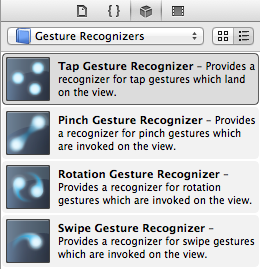
Before I do that though I need to correct an error in the example I showed last time. The gesture recognizers were assigned to the top level UIView which includes the toolbar and the toolbar button. This meant that any attempt to tap on the toolbar button was intercepted by the gesture recognizer preventing the button action from being called.
To correct this error I have introduced a subview that covers the entire user interface with the exception of the toolbar. The gesture recognizers can then be assigned to this subview leaving taps on the toolbar button to be handled by the button. For this example we need one Tap Gesture Recognizer object and two Swipe Gesture Recognizer objects. Dragging these objects onto the subview leaves us with a XIB file looks as follows:
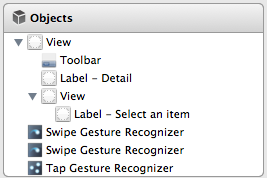
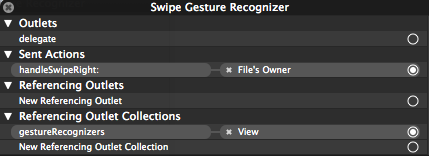
It is the second view in this list that the gestures are assigned to. If you find your gestures are not working check the Referencing Outlet Collections connection in Interface Builder to ensure they are connected to the correct view:
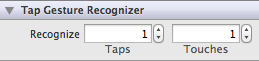
With the gestures added, configuration becomes easier as the inspector shows you the gesture specific configuration options. So the tap gesture allows you set to the number of taps and touches you want to recognize:
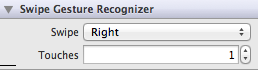
The swipe gesture allows you set the direction of the swipe (left, right, up, down) and the number of touches:
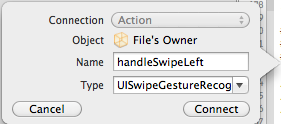
The final step is to set the target-action for each gesture. Using IB you can create the target-action by control-clicking on the object and then dragging into the implementation file. IB will then prompt you for the name of the action to insert:
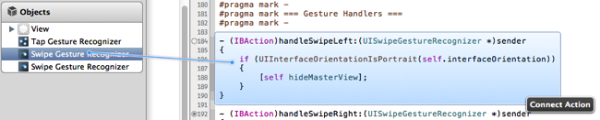
Since in this case we already have the action methods defined we will take a slightly different approach. We will first fix the methods to add IBAction hints for Xcode and then using the same control-click method drag each recognizer object to its method. As you mouse over the action it highlights to show the connection:
With the gestures configured and connected there is nothing more to do other than clean up the now redundant code from the view controller. A quick compile and run should confirm that the gestures are recognised and function as before.
It’s now out of date but you can find the archived Xcode project for this post in my code examples repository: